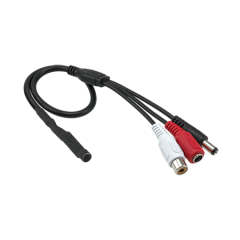
Axis 5032-531 T8353A 3.5mm Omnidirectional Microphone
The Axis 5032-531 is a compact omnidirectional microphone designed to add audio capture to compatible Axis network video products. It connects via a standard 3.5mm jack, making it a straightforward addition to camera and encoder deployments where audio documentation strengthens incident records and situational awareness. This is an accessory for integrators and facility managers who need audio without rebuilding their camera infrastructure.
Key Features
- Omnidirectional Pickup Pattern: Captures sound from all directions simultaneously. In an open office, retail space, or warehouse environment, this means you don't need to orient the microphone toward a specific sound source—audio is recorded evenly from 360 degrees around the capsule. Useful when you can't predict where conversation or noise will originate.
- 3.5mm Jack Connectivity: Connects to any Axis camera or encoder equipped with a 3.5mm microphone input jack. No USB adapters, no Ethernet audio modules, no extra power draw. If your camera has the input, you plug it in and configure audio in the video management system. Straightforward integration with minimal additional hardware.
- Natural and Neutral Audio Character: Delivers uncolored, balanced sound reproduction without emphasis on speech or ambient noise. This matters in incident documentation—you want an accurate audio record, not a filtered or bass-boosted version that might distort what was actually said or heard.
- Compact Form Factor: Small enough for discreet mounting near a camera, on a ceiling bracket, or mounted to a wall-mounted encoder without drawing attention. Installation footprint is minimal, which is critical in retail or office environments where aesthetics matter.
- Built for Surveillance Environments: Designed to function reliably in the same temperature and humidity conditions that cameras tolerate. No special environmental enclosure required if deployed indoors in standard HVAC spaces.
- Compatible with Axis Microphone Input Jacks: Works with any Axis network camera or encoder offering a 3.5mm microphone input. Verify your specific camera model supports audio input before purchasing—not all Axis models include this jack.
Integration and Compatibility
The 5032-531 integrates with Axis IP cameras and encoders that include a 3.5mm microphone input socket. Audio stream handling depends on your video management system—most modern VMS platforms (Milestone, Genetec, AXIS Camera Station, etc.) support ONVIF audio profiles and can record the audio stream alongside video. Consult your camera's technical documentation to confirm the microphone input is present and enabled in firmware. Audio levels may require adjustment in camera settings to avoid clipping or loss of fidelity.
Typical Deployment Scenarios
Suitable for retail loss-prevention setups where video alone doesn't capture conversations at checkout or in inventory areas. Warehouse and manufacturing environments benefit from audio to correlate alarms or incidents with voice communications. Office security deployments use omnidirectional mics in common areas (lobbies, corridors, conference rooms) to document who entered when and what was discussed. Parking areas and exterior facilities typically do not benefit from omnidirectional mics due to wind and traffic noise; consider directional alternatives if you need focused audio outdoors. For guidance on selecting the right microphone for your use case, refer to our audio capture and VMS architecture guide.
What's in the Box
The package contents are not specified in available documentation. Contact the manufacturer or your distributor to confirm what mounting hardware, cables, or documentation are included with your purchase.
Frequently Asked Questions
Q: Will the Axis 5032-531 work with any Axis camera?
A: No. The microphone requires a 3.5mm microphone input jack on the camera or encoder. Consult your camera's datasheet to confirm the input is present. Some Axis models feature audio input; others do not.
Q: Can I use this microphone outdoors?
A: The microphone is designed for indoor surveillance environments. Outdoor deployment exposes it to wind noise, rain, and temperature extremes. If you need outdoor audio, confirm the microphone meets IP67 or higher rating—the 5032-531 specifications do not indicate a weatherproof rating.
Q: What audio format does the microphone record in?
A: The microphone itself captures analog sound. The Axis camera or encoder digitizes and compresses it (typically as AAC or G.711). Audio encoding depends on your camera's codec settings and VMS configuration.
Q: Do I need separate power for the microphone?
A: No. The 3.5mm jack draws negligible power. The camera supplies any required bias voltage through the input jack. No external power supply or batteries needed.
Q: How do I adjust audio levels?
A: Audio input levels are typically configured in the Axis camera's web interface or management client under audio settings. You may need to adjust gain or input sensitivity to avoid clipping in loud environments or to boost quiet spaces.
Ted PerryPerspective based on aggregated IP Security Depot and affiliated engineering team experience.
The Axis 5032-531 is a no-fuss audio accessory that works only if your camera has a 3.5mm microphone input jack—so verify that first. The omnidirectional pickup pattern means you're recording sound from all directions at once, which is a practical advantage in open indoor spaces but a liability outdoors where wind will dominate the recording. This is a straightforward analog microphone; the Axis camera handles digitization and streaming.
Technical Highlights:
- Omnidirectional Capsule: Pickup from 360 degrees eliminates the need to orient the microphone toward a speaker or sound event. In retail or warehouse settings, this simplicity often outweighs the tradeoff of less focused audio—you capture what happens in the space, period.
- 3.5mm Jack Standard: Standard audio connector across consumer and professional equipment. No proprietary connectors, no firmware dependencies. Plug, configure in the camera's audio settings, and record. Integrators appreciate the lack of complexity.
- Neutral Frequency Response: No EQ boost or speech emphasis built in. Useful for documentation where you need an accurate audio record, not a processed version. Drawback: in noisy warehouses or outdoor areas, ambient noise isn't filtered—you record what's there.
Deployment Considerations:
- Verify your Axis camera model includes a 3.5mm microphone input jack in its specification sheet. Many compact or budget Axis models omit audio input entirely.
- Outdoor or high-wind environments will pick up significant wind noise through an omnidirectional capsule. Indoor deployments (retail, office, warehouse with HVAC) are the safe bet.
- Audio levels need tuning in the camera's web interface. Underleveled audio won't capture quiet conversations; overleveled audio will clip and distort loud events. Plan for commissioning time.
Best fit: retail environments (POS areas, fitting rooms, stockrooms) and indoor warehouses where you need audio backup to video for incident documentation. Skip it for outdoor perimeter audio—directional microphones or integrated camera audio are better choices there.