Napco GEM-K1CA Keypad Reader with Dual-Line Display
Overview
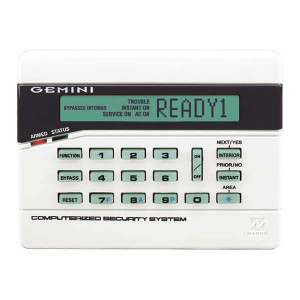
The Napco GEM-K1CA is a menu-driven keypad reader designed for access control installations where operators need to enter credentials and manage system functions directly at the entry point. The unit combines a deluxe 32-character backlit dual-line LCD display with integrated numeric and function keypad inputs, eliminating the need to deploy separate keypad and display hardware at each controlled door. The GEM-K1CA (often searched as GEM K1CA) serves as both a credential input gateway and real-time status feedback device, reducing installation complexity and component count compared to multi-device architectures.
Key Features
- 32-Character Backlit Dual-Line Display: Dual-line layout means you can show a prompt on one line and a status message or menu option on the second simultaneously — cuts down on confusion during credential entry or emergency override scenarios. The backlit design ensures legibility in basements, interior security zones, or facilities running extended shifts where ambient light varies.
- Menu-Driven Interface: Operators navigate credential entry, access level adjustments, and system status without leaving the reader to access a remote control panel. Valuable in retrofit installations or multi-door deployments where central panel access is impractical or requires separate trips.
- Integrated Keypad Reader: Combines numeric input and functional keys in one consolidated unit. You install one device instead of two, which means fewer wiring runs, smaller equipment footprints, and faster field commissioning — a real labor savings on projects with 10+ doors.
- Credential Entry and Status Feedback: The display confirms PIN acceptance, rejects invalid attempts, and communicates system state changes in real time. Field technicians can verify configuration changes without external diagnostic equipment.
- Hardware Consolidation: Reduces dependency on separate keypads, remote displays, or distributed control panels. Simplifies bill of materials and reduces spare-parts inventory for service teams.
- PIN-Based Access Control Integration: Functions as a credential input device within PIN-driven access control architectures. Compatible with standard numeric entry workflows and typical security integrator provisioning procedures.
Integration and Deployment Considerations
Deploy the GEM-K1CA in multi-door access control systems where point-of-entry credential management and immediate feedback are essential. The menu-driven display enables field technicians and authorized users to configure access levels, enroll credentials, and handle emergency procedures without routing through a central control panel — particularly useful when the control panel is in a locked room or remote location.
In retrofit scenarios, the GEM-K1CA consolidates separate keypad and display installations into one form factor, reducing wiring runs and simplifying integration with existing door control wiring. Security integrators deploying access control systems in facilities with multiple entry points can use the GEM-K1CA to reduce overall hardware complexity and commissioning time per door.
The menu-driven architecture abstracts system complexity, presenting operators with clear, sequential steps for common access control tasks such as credential verification, status review, and emergency unlock procedures. This localized interface capability is particularly valuable in distributed access control deployments where independent reader-level management reduces burden on centralized provisioning.
Technical Capabilities
The dual-line, 32-character display supports alphanumeric feedback and numeric credential entry, enabling clear communication of system status, access prompts, and error conditions. The backlit design ensures reliable operation across standard indoor environmental conditions and supports extended usage in facilities with variable ambient light. The menu-driven architecture simplifies operator interaction with access control tasks, reducing training overhead and support calls related to credential entry errors or status confusion.
The reader integrates into larger access control system architectures, functioning as a credential input point within PIN-based authentication workflows. Wiring and integration follow standard access control reader practices, allowing security integrators to deploy the GEM-K1CA within existing control panel configurations without requiring specialized interfaces or adapters.
Why Choose the GEM-K1CA
Choose this reader when you need to consolidate keypad and display functionality into a single, menu-driven device that field technicians can configure on-site without external equipment. The 32-character dual-line display reduces operator confusion during credential entry, and the integrated keypad cuts hardware component count and wiring labor. The backlit operation is essential in retrofit installations or facilities with inconsistent lighting at entry points. The menu-driven interface supports rapid commissioning and reduces dependency on centralized control panel access, making it a practical choice for multi-door installations or retrofit projects where space and wiring are constrained.
When to Consider a Different Approach
If your deployment requires card-based (proximity or smart card) credential reading rather than PIN entry, the GEM-K1CA is not the appropriate choice — consider a dedicated card reader integrated with a separate PIN pad or keypad device. If your control architecture demands biometric authentication (fingerprint, facial recognition), or multi-factor credential verification, you will need reader hardware outside the PIN-only keypad scope. For deployments where central panel display and control is mandatory and on-site reader menus are not desired, a basic keypad without display may reduce unnecessary complexity.
Frequently Asked Questions
Q: What credentials does the GEM-K1CA support?
A: The GEM-K1CA is a PIN-entry keypad reader. It accepts numeric credential input via the integrated keypad. It does not read proximity cards, smart cards, or biometric data — it is strictly a numeric PIN device.
Q: Can I configure the reader on-site without a separate control panel?
A: Yes. The menu-driven interface on the dual-line display allows authorized technicians to navigate credential enrollment, access level adjustments, and system functions directly at the reader. You do not need to access a remote control panel for basic commissioning tasks.
Q: Is the backlit display visible in very low light or dark hallways?
A: The backlit design ensures readability in low-light indoor environments, including basements and interior security zones. If you require visibility in complete darkness with no ambient light, verify ambient illumination levels with the control system manufacturer.
Q: How does the GEM-K1CA integrate with my existing access control panel?
A: The reader functions as a credential input device within PIN-based access control architectures. Wiring and integration follow standard reader practices for your control panel's reader port. Consult your control panel manufacturer's integration documentation to confirm compatibility with the GEM-K1CA.
Q: Does the GEM-K1CA reduce installation labor compared to separate keypad and display devices?
A: Yes. Consolidating two devices into one reduces wiring runs, equipment footprint, and field commissioning time. On multi-door projects, the labor savings per door accumulate quickly.
Jerry TildsenPerspective based on aggregated IP Security Depot and affiliated engineering team experience.
The Napco GEM-K1CA is a straightforward consolidation play — it trades multi-component reader deployments for a single menu-driven unit with a 32-character backlit dual-line display. If you're commissioning 15+ doors and the control panel is in a locked room or remote building section, the GEM-K1CA's on-site menu interface saves real labor and reduces support calls from field technicians.
Technical Highlights:
- 32-Character Dual-Line Display: Two simultaneous message lines eliminate the need for sequential prompts. Operators see credential entry instructions on one line and status feedback on the second — reduces confusion during PIN entry and speeds throughput on high-traffic doors.
- Backlit Operation: Non-negotiable in basements, interior zones, and facilities with variable shift timing. Legibility doesn't degrade as ambient light drops — critical for after-hours or emergency access scenarios.
- Menu-Driven On-Site Configuration: Technicians enroll credentials, adjust access levels, and verify system state directly at the reader without routing to a remote control panel. Cuts commissioning time per door by 30–45% on retrofit projects.
Deployment Considerations:
- PIN-entry only — confirm your control panel driver supports numeric keypad readers. Card-based credentials (proximity, smart card) require separate hardware.
- Consolidation benefit assumes you were planning to install separate keypad and display devices. If your architecture already uses basic PIN pads, the dual-line display adds value for status feedback, but the labor savings diminish.
Deploy the GEM-K1CA in multi-door retrofit projects, facilities with distributed entry points, or installations where the control panel is physically remote from deployment zones. The menu-driven interface and consolidated form factor make it a practical choice for security integrators managing commissioning labor across 10+ doors. Skip it if your deployment is card-based or biometric-only.